
How to Find Apps That Are Secretly Accessing Your Data (2026 Guide)

You know that weird feeling when you mention something in passing... and then an ad for that exact thing shows up on your phone five minutes later?
Yeah. That's not your imagination.
Your apps are watching. Listening. Tracking. And the scary part? You probably gave them permission to do it without even realizing what you were agreeing to.
Here's what happened to me last month. I downloaded a simple flashlight app (because apparently my phone's built-in one wasn't good enough). The app asked for permission to access my location, contacts, and camera. For a flashlight. I almost hit "accept" without thinking... because that's what we all do, right?
But then I paused. Why would a flashlight need my contacts?
Turns out, Facebook and Instagram each collect 156 data points linked to users, making them the most data-hungry apps out there. And that's just the beginning. According to recent research from 2025 , 75 percent of iOS apps and 70 percent of Android apps both collect sensitive data and share it with third parties.
So if you're wondering whether your phone is spying on you, the answer is yes. But there's good news: you can actually find out which apps are doing it and stop them.
The Real Problem Nobody Talks About
Look, I'm not going to pretend we can live in a world without apps. We can't. They're too useful, too convenient, too essential to how we function now. But here's what most people don't understand about app data collection.
When you install an app and tap "accept" on those permissions, you're not just letting that one app peek at your photos or check your location. You're potentially opening a door to hundreds of third-party companies you've never heard of.
Tom Blanchard, CEO of Sterling Technology Solutions , puts it bluntly: we've all come across those terms and conditions that are "50,000 pages long," and we "just hit accept" without understanding what we're agreeing to.
And it gets worse. Recent studies show that TikTok collects 24 distinct data types and shares 6 categories with third parties, including your name, street address, and phone number. Weather apps track your location 24/7 and sell that data to advertisers. Even calculator apps sometimes ask for camera access.
The permission requests have gotten sneaky too. Apps don't hit you with everything at once anymore. They use what experts call "just-in-time" requests, according to the 2025 App Privacy Index . You tap to record a video, and boom... suddenly you're granting permanent microphone access for what felt like a one-time thing.
The Warning Signs Your Phone Is Leaking Data
Your phone will tell you when something's wrong. You just need to know what to look for.
Battery drain that doesn't make sense. You're not gaming. Not streaming. Not even scrolling that much. But your battery's dead by noon. That's often a sign that apps are running in the background, tracking your GPS, syncing with servers, or recording audio without you knowing.
Data usage spikes. Check your settings and look at which apps are using the most data. If a calculator app is chewing through hundreds of megabytes, something's seriously wrong. According to research , tracking apps send analytics and usage patterns to remote servers in the background... and it all counts against your data plan.
Random location icon appearances. See that little arrow icon pop up in your status bar when you're not using Maps or calling an Uber? That means something is actively tracking your location right now. And if you're not sure which app it is, that's a problem.
Apps requesting permissions that make zero sense. A flashlight wanting your contacts. A weather app asking for microphone access. A game requesting your exact location. If the permission doesn't obviously relate to what the app does, that's a massive red flag.
The Cybernews security team identified 41 "dangerous" permissions that apps can request, each capable of affecting your privacy or your phone's core functionality.
How to Check What Your Apps Are Actually Doing (Step by Step)
Alright, enough scary stories. Here's how you actually take control.
For iPhone Users
Apple built in some genuinely useful privacy tools. You just need to know where to find them.
First, open Settings and scroll down to "Privacy & Security." This is your command center for everything apps can access.
You'll see categories like Location Services, Contacts, Camera, Microphone, Photos. Tap any category and you'll see every app that's requested access to it. The ones with checkmarks? Those are currently allowed.
Here's what you do: go through each category and ask yourself, "Does this app actually need this?" Instagram needs your camera to post photos... that makes sense. But does that random game from two years ago need access to your microphone? Probably not.
For location specifically (which is one of the biggest privacy leaks), you have four options for each app:
- Never
- Ask Next Time Or When I Share
- While Using the App
- Always
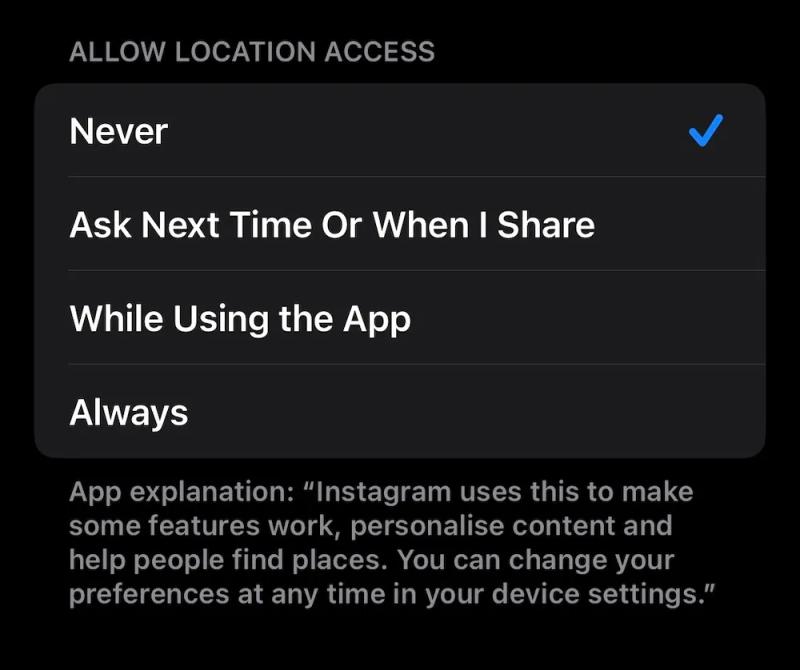
Never give "Always" access unless you absolutely trust the app and understand why it needs 24/7 location tracking. Even Google Maps works fine on "While Using the App."
The secret weapon: App Privacy Report. This is hidden at the bottom of the Privacy & Security menu. Turn it on, then let your phone run normally for a few days.
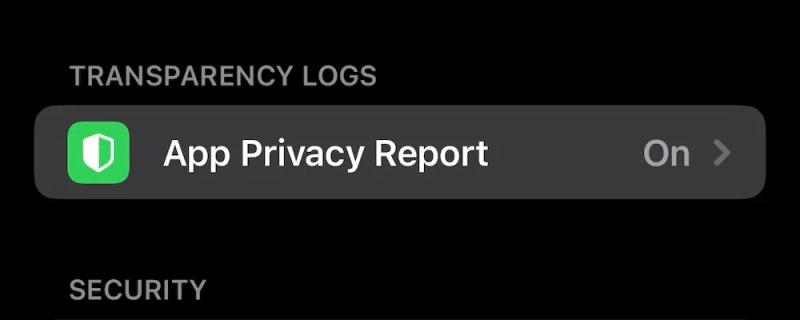
When you come back, you'll see detailed logs of what apps are doing in the background. Which apps accessed your microphone when you weren't using them. Which ones contacted servers you've never heard of. What websites are tracking you across multiple domains.
I checked mine last week and discovered that a news app I barely use was accessing my location 47 times in one day. Deleted.
For Android Users
Android gives you similar tools, but they're organized a bit differently.
Open Settings, then tap "Apps" (or "Apps & Notifications" depending on your phone). Select any app and tap "Permissions" to see what it can access.
Just like iPhone, go through and revoke anything that seems excessive. That shopping app doesn't need access to your phone calls. That photo editor doesn't need your location.
Android also lets you set time-based permissions. You can tell apps, "You can have location access only while I'm actively using you." That's usually the safest option.
But here's where Android users have an advantage: apps like TrackerControl.
TrackerControl is a free tool (you'll need to download the full version from site or from GitHub, not the Play Store slim version) that shows you in real-time which apps are trying to phone home to which servers. It creates a local VPN on your device to monitor all network traffic, then lets you block specific trackers.
The interface shows you three categories: Essentials (servers the app actually needs), Analytics (usage tracking), and Marketing (advertising networks). You can block entire categories or individual trackers.
Fair warning though... aggressive blocking sometimes breaks apps. If something stops working after you block its trackers, you'll need to either allow some categories through or find a less invasive alternative app.
The Cross-Platform Reality Check
Regardless of whether you use iPhone or Android, you need to audit your permissions at least once every few months. Apps update all the time, and new permissions can get added without you realizing it.
Here's my personal system: I set a reminder every three months to spend 20 minutes going through my app permissions. It's tedious, sure. But it's also how I discovered that my banking app had somehow gotten access to my microphone (revoked immediately), and that five apps I'd downloaded and forgotten about were still running in the background.
Delete apps you don't use anymore. It's the single most effective privacy move you can make. That game you played once six months ago? Gone. That shopping app for a store you never visit? Deleted. Every app on your phone is a potential privacy leak, so keep only the ones you actually need.
Finding the Worst Offenders in Your App Library
Some apps are just worse than others when it comes to data collection. You need to know which categories are the biggest problems.
Social media apps are the champions of data hoarding. We already know about Facebook and Instagram's 156 data points each, but it's not just Meta. According to Surfshark's research , social media and food delivery apps each track an average of 20 out of 32 possible data types. YouTube collects 24 data types. Twitter (X) collects extensively across categories.
"Free" apps are never really free. They're collecting your data as payment. Games are particularly aggressive about this. Many free games contain trackers from Google, Facebook, and advertising networks... even when the game itself has nothing to do with those companies.
Weather apps are surprisingly invasive. Many track your location 24/7 and sell that data to third parties. You don't need a weather app that knows where you are every second of every day. Your phone's built-in weather widget is usually enough.
Foreign-owned apps present unique risks. A study found that 6 out of 10 popular foreign-owned apps in the US originate from China, collecting an average of 18 types of data from each user and sharing 6. Apps like Temu, Shein, and AliExpress fall into this category.
Recent research specifically highlighted that TikTok can track users across other apps and websites, creating detailed behavioral profiles, and its Chinese ownership raises concerns about potential government access to user data.
But domestic apps aren't innocent either. Amazon's app tracks extensive personal information including browsing habits, location data, and voice recordings from Alexa interactions. Spotify collects detailed listening habits and shares this data with advertisers and record labels.
What the Data Breaches You Never Heard About Mean for You
Here's something that keeps security experts up at night: the apps collecting your data can't always protect it.
In 2025, Discord suffered a catastrophic breach that exposed 1.5 terabytes of user data, including selfies, government IDs, emails, and phone numbers from roughly 70,000 people. This happened after hackers compromised their customer service vendor.
But most breaches don't make headlines. A cybersecurity expert named Arjun Bhatnagar shared a story about a parking app breach notification that revealed exposed data including names, addresses, license plate numbers, vehicle details, personal interests, and behavioral patterns. All that from an app you just wanted to use to pay for parking.
The real problem? As Bhatnagar explained, "We give the same information to the IRS that we give to Domino's pizza. That phone number, for example, can easily tie your entire digital life" and everyone you're connected to with just one data point.
When a company gets breached, they're usually required to notify you about password exposure. But they often downplay everything else that got leaked. That "minor" breach might have exposed your location history, your contacts, your photos, your browsing habits... all the stuff they've been collecting that you forgot you gave them permission to take.
The Tools That Actually Work for Finding Sneaky Apps
You don't need to be a cybersecurity expert to protect yourself. These tools do the heavy lifting.
iPhone: App Privacy Report (built-in, free). Turn it on in Privacy & Security settings. Let it run for a week. Come back and review which apps accessed what, how many times, and what domains they contacted. This single feature has probably saved more people's privacy than any third-party app.
Android: TrackerControl (free, open source). Download the full version from GitHub to get blocking features. It monitors all network traffic on your device and categorizes every tracker. You can block trackers individually or by category. Yes, it uses your VPN slot, so you can't run a traditional VPN alongside it. But for seeing exactly what your apps are doing, nothing beats it.
Both platforms: Privacy Pro (paid). This is what Washington Post reporters used to analyze their own tracking. It identifies and blocks trackers across your apps, though it doesn't provide as much detail as iPhone's built-in tools about what type of data is being collected.
Desktop: Avira Mobile Security (freemium). Detects suspicious apps requesting unnecessary permissions and provides privacy scans. The free version covers basics. The paid version includes VPN and more comprehensive monitoring.
For checking before you download: Surfshark's App Tracker Database . They maintain an interactive table showing how data-hungry different apps are. Select your app category (weather, dating, shopping, etc.) and toggle what data you're willing to share. It shows you alternatives that collect less.
Here's my workflow: before installing any new app, I check Surfshark's database to see what data it collects. After installing, I immediately check the permissions and revoke anything excessive. Then I let App Privacy Report or TrackerControl monitor it for a week. If it's sending data to sketchy servers or accessing stuff it doesn't need, I delete it and find an alternative.
The Hard Truth About "Privacy-Friendly" Alternatives
Want to know which apps actually respect your privacy? According to research, the answers might surprise you.
ParentSquare scored just 4 points on the App Privacy Index (lower is better), and Microsoft Edge scored 11. These apps prove that you can deliver great functionality without hoovering up every piece of data on your device.
For messaging: Signal uses end-to-end encryption and collects minimal data. WhatsApp claims that if you don't interact with Meta AI, your data won't be used for AI development (though it still collects plenty for other purposes). But if you want genuine privacy, Signal is the gold standard.
For browsing: DuckDuckGo, Brave, and Firefox are designed with privacy as their core selling point. Chrome tracks nearly half of all possible data types. Safari is better, but still tied to Apple's ecosystem. The alternative browsers actively block trackers and don't build detailed profiles on you.
For search: DuckDuckGo doesn't track your searches or build a profile on you. Google Search is literally an advertising company's product, so guess what they're doing with your search history.
For payment apps: MoneyGram collects just 8 types of browser data (and zero from its iOS app). Compare that to PayPal's 26 data types or Venmo's 21. Cash App also collects extensively. If you need to send money, consider using your bank's built-in transfer features instead of these third-party apps.
For social media: This is tough because the network effects matter more than privacy. But if you must use social platforms, Discord scored lowest on data collection in the 2025 audit (before their breach), followed by Pinterest and Quora. Instagram, Facebook, and TikTok are the worst offenders by far.
The catch is that alternative apps often have smaller user bases or fewer features. You have to decide what trade-offs you're willing to make. I use Signal for sensitive conversations and regular messaging apps for group chats with friends who won't switch. I use DuckDuckGo for most searches but switch to Google when I need very specific results. You don't have to be perfect... you just need to be intentional.
How Companies Manipulate You Into Giving Permission
App developers have gotten really good at making you say yes without thinking.
The "just-in-time" request is their favorite trick. The app doesn't ask for all permissions upfront anymore. Instead, it waits until you're actively trying to use a feature. You tap to record a voice message, and suddenly there's a popup asking for microphone access. In that moment, granting permission feels necessary... even if the app is asking for permanent access for a one-time use.
Another tactic: burying the real permissions deep in settings. You grant location access on "While Using App," but then discover that the app still tracks you in the background because there's a separate toggle hidden three menus deep.
Or the deliberate confusion. Apps will say they need a permission for "user experience" or "functionality" without explaining what they actually do with the data. Weather apps claim they need your location for accurate forecasts (reasonable) but don't mention they're also selling your location history to data brokers (not reasonable).
And my personal least favorite: the permission creep. You install an app that asks for minimal permissions. You use it for months. Then an update hits, and suddenly it has new permissions you never explicitly granted. On some phones, app updates can add permissions without requiring re-approval.
Cybersecurity advisor Adrianus Warmenhoven notes that research found up to 74% of the most popular mobile apps collect more data than they should in order to function properly. On average, this happened for every fifth requested permission.
The solution? Arjun Bhatnagar advocates a simple strategy: Start with 'No.' Use the app and give selective permissions as you use it. He shares that no matter how much TikTok asks for access to his contacts, he continues to say no.
This approach reveals how many apps request far more access than they actually need. Most will work fine without the excessive permissions. The ones that won't? Maybe you don't need those apps.
What to Do When You Find Apps Abusing Your Data
So you've checked your permissions and discovered that half your apps are doing sketchy things. Now what?
Revoke permissions immediately for anything excessive. Go through each suspicious app and turn off every permission it doesn't absolutely need. If the app breaks or complains, you'll know those permissions were actually required for basic functionality. If it keeps working fine, you just saved yourself from unnecessary tracking.
Delete apps that refuse to work without invasive permissions. If a simple game demands access to your contacts and won't function without it, that's not a game you need. Find an alternative that respects boundaries.
Report egregious violations. Both Apple and Google have mechanisms for reporting apps that violate their privacy policies. Apple is generally more aggressive about enforcement. Google is slower but does eventually act on flagrant violations.
Leave reviews warning others. When you discover an app requesting unnecessary permissions or secretly collecting data, leave a review explaining exactly what it's doing. This helps other users make informed decisions.
Consider alternatives systematically. Don't just delete problem apps and leave gaps in your workflow. Research privacy-respecting alternatives first, test them out, then switch. This prevents you from desperately reinstalling the invasive app because you still need its functionality.
Contact developers directly. Sometimes it helps. Send an email explaining that you're uninstalling because of privacy concerns and asking what data they actually need versus what they want. Occasionally, you'll get a human response that either justifies the permissions or leads to changes in future updates.
But here's the hard part: sometimes you'll discover that an app you love, an app you depend on, is violating your privacy in ways you can't accept. And there might not be a good alternative.
I went through this with a meditation app I'd used for three years. Discovered it was tracking my location constantly and sharing data with advertising networks. The alternatives weren't as good. I stuck with it for a few months in denial, then finally forced myself to switch. It sucked. But my data mattered more than a slightly better user interface.
Building a Sustainable Privacy Strategy
You can't check your permissions every day. You'd go crazy. But you can build a system that protects you without constant vigilance.
The quarterly audit. Set a reminder every three months. Spend 30 minutes going through all your app permissions. Delete apps you're not using. Revoke unnecessary permissions from apps you are using. Check for new apps that somehow got installed (looking at you, carrier bloatware).
The download protocol. Before you install any new app, check what data it collects. Read reviews mentioning privacy. Look at the permissions it requests. If it seems invasive, search for alternatives before you commit. This five-minute investment up front saves hours of cleanup later.
The default to "no" rule. When an app asks for permission, your automatic response should be to deny first. If you actually need that permission for something specific, you can always grant it later. But starting with "no" means apps have to earn access instead of getting it by default.
The separation strategy. Don't use your real email for every app. Create separate emails for different categories: one for financial apps, one for shopping, one for games, one for everything else. This limits how much data can be connected across services. When that free game eventually suffers a breach, your banking info isn't connected to it.
The phone number problem. This is tougher. Your phone number is a unique identifier that ties together your entire digital life. Some apps (I'm looking at you, WhatsApp) require it. When possible, use services that don't need your number, or use a Google Voice number for apps you don't fully trust.
The VPN question. VPNs help hide your location and encrypt your traffic, which prevents your ISP and network admins from tracking you. But they don't stop apps from collecting data once you've granted them permissions. A VPN is one layer of protection, not a complete solution. And remember, if you use TrackerControl on Android, you can't simultaneously run a traditional VPN.
Security expert Ed Amoroso puts it bluntly: "When it comes to enterprise privacy risk, mobile applications are some of the worst offenders", yet the risks persist unaddressed.
The Conversation We Need to Have About Kids and Apps
If you have children, this gets even more critical.
Research shows that apps specifically targeting children often have the worst privacy practices. There have been multiple investigations into TikTok, Facebook, Instagram, and Snapchat for collecting personal information from children without proper parental consent. Microsoft was fined $20 million for collecting data from children signing up for Xbox accounts.
Kids don't understand what they're giving away when they grant permissions. They just want to play the game or message their friends. They're not thinking about how their location data might be sold to advertisers or how their photos might be stored indefinitely.
For parents: practical steps that work
Check your child's phone regularly. Look at what apps they've installed and what permissions those apps have. Don't frame this as snooping... frame it as safety maintenance, like checking that their bike helmet fits properly.
Use parental controls at the system level. Both iOS and Android let you restrict what apps can be installed, what permissions can be granted, and what content can be accessed. Enable these before handing your child a device.
Teach them the questions to ask. "Why does this game need my location?" "Why does this app want access to my contacts?" Help them develop the instinct to question every permission request.
Monitor unusual device behavior. If your child's phone is suddenly draining battery fast or getting warm when they're not using it, check what's running in the background. Apps targeting kids are often loaded with tracking software.
The goal isn't to make kids paranoid about technology. It's to teach them that their data has value and they should be thoughtful about who gets access to it.
What Actually Works (And What's Just Security Theater)
You've probably heard a lot of privacy advice over the years. Here's what actually matters.
What works:
- Revoking unnecessary permissions
- Deleting unused apps
- Using App Privacy Report or TrackerControl
- Starting with "no" on permission requests
- Regular privacy audits
- Reading app reviews for privacy red flags
- Choosing privacy-focused alternatives when possible
What's mostly security theater:
- Covering your camera with tape (permissions control this)
- Putting your phone in airplane mode constantly
- Deleting and reinstalling apps frequently
- Clearing cookies obsessively (on mobile this matters less)
- Reading 50-page privacy policies (they're deliberately incomprehensible)
What's complicated:
- Using VPNs (helpful for some things, useless for others)
- Jailbreaking or rooting (gives more control but creates security vulnerabilities)
- Using ultra-locked-down custom ROMs (great if you know what you're doing, problematic if you don't)
The truth is that perfect privacy doesn't exist. If you want to use modern apps, you will have to share some data. The question is whether you're making that trade consciously or unconsciously.
Taking Back Control: Your Action Plan for the Next Hour
Enough theory. Here's exactly what to do right now.
Spend 10 minutes on this immediately:
- Open your phone's settings
- Go to Privacy & Security (iPhone) or Apps (Android)
- Check Location Services first (biggest privacy leak)
- Revoke "Always" access for any app that doesn't absolutely need it
- Switch most apps to "While Using" or "Never"
Spend 20 minutes on this today:
- Go through Camera, Microphone, and Contacts permissions
- Question every single app with access
- Delete any apps you haven't used in 3+ months
- Turn on App Privacy Report if you're on iPhone
- Download and set up TrackerControl if you're on Android
Spend 30 minutes on this this week:
- Research privacy-respecting alternatives to your most data-hungry apps
- Set a calendar reminder for quarterly privacy audits
- Create a separate email account for games and shopping apps
- Review your social media privacy settings (those change constantly)
- Talk to your family about their app permissions
You're not trying to become invisible. You're just trying to stop actively handing over your entire digital life to companies that see you as a product, not a customer.
The apps on your phone know where you've been, who you talk to, what you buy, what you search for, when you sleep, and what you're interested in. They build profiles more detailed than what most of your friends know about you.
But they only know this stuff because you told them. And what you've given, you can take back.
Start checking your permissions. Delete the apps you don't need. Question every request for access. It'll feel tedious at first, but eventually it becomes second nature.
Your data is yours. Maybe it's time to act like it.