
How to Run Claude Code Locally with Ollama in 2026 (Free & No Subscription)

I was burning through $150 a month on Claude Code.
Don't get me wrong. It's brilliant. Anthropic's agentic coding tool lives in your terminal and can read files, modify code, run tests, and basically act like an AI pair programmer on steroids. But every keystroke was costing me money. Every experiment. Every mistake that needed fixing.
Then on January 16th, 2026, everything changed.
Ollama announced version 0.14.0 with something most people didn't understand the significance of: Anthropic Messages API compatibility. Translation? You can now run Claude Code completely free using local open-source models on your own machine. No subscription. No API costs. Your code never leaves your computer.
If that sounds too good to be true, I thought so too. But I've been running it for two weeks now. It works. Really well, actually. And I'm going to show you exactly how to set it up, which models to use, what works, what doesn't, and whether this is actually worth the hassle.
What Actually Changed (And Why It Matters)
Until January 2026, using Claude Code meant one thing: sending your code to Anthropic's servers and paying for their API. There was no other option. Some people tried hacks and weird adapters to get it working with local models, but the integrations were fragile and broke with every update.
Now, with Ollama v0.14.0+, you can run Claude Code locally with open-source models or connect to cloud models. This opens up faster, more flexible coding workflows without being tied to the cloud.
Here's what this means in practice. Claude Code is the tool, the interface, the agent that knows how to navigate codebases and make intelligent changes. But it no longer requires Claude's actual AI models. It can use any model that speaks the Anthropic API format. And Ollama provides exactly that.
Ollama now offers Anthropic API compatibility, which means Claude Code can interact with any Ollama model. You can run models locally on your machine, connect to cloud models hosted by Ollama, and use Claude Code features like multi-turn conversations, tool calling, and vision inputs.
The practical benefit? Complete privacy. Your code never leaves your machine (not even metadata). No API costs. Inference is free (well, aside from electricity). Offline capability. Work without internet (perfect for planes, trains, or automobiles).
But let's be honest. You lose access to Anthropic's very top models like Opus 4.5. The top open source coding models are very good in their own right, but they're not quite at the same level. For building demos and MVPs and, importantly, for learning Claude Code, they will be more than good enough.
What You Actually Need (Hardware Requirements)
Before we dive into setup, let's talk about whether your machine can handle this.
Running local LLMs isn't like running regular software. These models are massive and require serious hardware. Here's the reality check.
Minimum requirements for usable experience:
- 16GB RAM (but expect slower performance and smaller models)
- Modern CPU (M1 or newer for Mac, recent Intel/AMD for PC)
- 50GB+ free disk space for models
- Patience for slower inference times
Recommended for good experience:
- 32GB RAM (Apple Silicon unified memory or PC RAM)
- Dedicated GPU with 8GB+ VRAM (optional but makes everything faster)
- 100GB+ free disk space if you want multiple models
- SSD for faster model loading
If you want Claude Code + local models to be genuinely usable for coding (not just a demo), aim for 32GB RAM. At 16GB you can run smaller models, but the experience tends to be rough (more wrong edits + more retries = slower overall).
Here's what different hardware gets you:
Mac M1 with 16GB: Can run small models like devstral-small-2 (24B) but expect slow performance. A simple "Hi" might take 55 seconds. Listing files could take 2 minutes. Doable for learning, frustrating for real work.
Mac M1/M2 with 32GB: Good sweet spot. Can run devstral-small-2 (24B) comfortably or qwen3-coder:30b with acceptable speed. This is where local development becomes genuinely practical.
High-end desktop with GPU: Can run larger models like gpt-oss:120b or qwen3-coder:480b (quantized versions). Much faster inference. This is where local models start approaching cloud performance.
The bottom line: Third-party alternatives can save you up to 98% compared to Opus 4.5. DeepSeek V3.2 is the cheapest at ~$0.28/0.28/0.42 per million tokens, while local options like Ollama are completely free.
Step-by-Step Setup (The Easy Way)
Alright, let's actually do this. I'm going to show you two methods. The easy way that works for most people, and the manual way for people who want more control.
Step 1: Install Ollama
First, we need Ollama itself. This is the software that runs the models locally.
For Mac and Linux:
curl -fsSL https://ollama.ai/install.sh | shFor Windows: Download from ollama.com and run the installer.
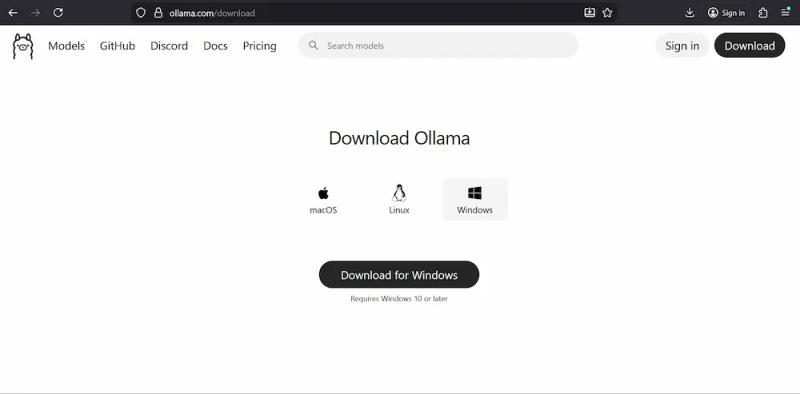
That's it. Ollama is now installed. You can verify by running:
ollama --versionYou should see something like ollama version 0.15.0 or higher.
Step 2: Pull a Model
Now we need to download an AI model. This is where things get interesting because there are a lot of options.
For Claude Code, you need models with at least 64K token context length. We recommend at least 64k tokens for smooth interactions.
Best models for Claude Code (as of early 2026):
qwen3-coder is the most popular choice. Good balance of capability and speed. Works well on 32GB RAM machines.
ollama pull qwen3-coderglm-4.7-flash is recommended by Ollama for tool-calling support. Strong coding ability with 128K context.
ollama pull glm-4.7-flashdevstral is Mistral's agentic coding model built specifically for software engineering. The #1 open source model on SWE-bench. Excellent for using tools to explore codebases and editing multiple files.
ollama pull devstralgpt-oss:20b is OpenAI's open-weight model. Good for complex reasoning and coding tasks.
ollama pull gpt-oss:20bThese downloads are large (10-30GB depending on model). Go make coffee. This will take a while on first download.
You can check what models you have with:
ollama listStep 3: Install Claude Code
Claude Code is installed via npm (Node Package Manager). You'll need Node.js 18+ installed first.
Check if you have Node.js:
node --versionIf not, download from nodejs.org .
Install Claude Code globally:
npm install -g @anthropic-ai/claude-codeVerify it installed:
claude --versionStep 4: Configure Environment Variables (The Simple Way)
This is the easiest method. Ollama v0.15+ added a new command called ollama launch that sets everything up for you automatically.
Just run:
ollama launchThis will guide you to select models and launch your chosen integration. No environment variables or config files needed.
Follow the prompts. Select Claude Code from the list. Choose the model you downloaded earlier. Done.
Now you can run Claude Code with:
claudeIt will automatically connect to your local Ollama instance and use the model you selected.
Step-by-Step Setup (The Manual Way)
If you want more control or if ollama launch doesn't work for some reason, here's the manual configuration.
Set Environment Variables
You need to tell Claude Code to connect to Ollama instead of Anthropic's servers.
For Mac/Linux (bash):
Add these to your ~/.bashrc or ~/.bash_profile:
export ANTHROPIC_BASE_URL="http://localhost:11434"export ANTHROPIC_AUTH_TOKEN="ollama"export ANTHROPIC_API_KEY=""export CLAUDE_CODE_DISABLE_NONESSENTIAL_TRAFFIC=1Then reload your shell:
source ~/.bashrcFor Mac/Linux (zsh):
Add the same lines to ~/.zshrc:
export ANTHROPIC_BASE_URL="http://localhost:11434"export ANTHROPIC_AUTH_TOKEN="ollama"export ANTHROPIC_API_KEY=""export CLAUDE_CODE_DISABLE_NONESSENTIAL_TRAFFIC=1Then:
source ~/.zshrcFor Windows (PowerShell):
$env:ANTHROPIC_BASE_URL="http://localhost:11434"$env:ANTHROPIC_AUTH_TOKEN="ollama"$env:ANTHROPIC_API_KEY=""$env:CLAUDE_CODE_DISABLE_NONESSENTIAL_TRAFFIC="1"Or set them permanently in System Environment Variables through Windows Settings.
Alternative: Use Config File
Instead of environment variables, you can create a config file at ~/.claude/settings.json:
{ "env": { "ANTHROPIC_BASE_URL": "http://localhost:11434", "ANTHROPIC_AUTH_TOKEN": "ollama", "CLAUDE_CODE_DISABLE_NONESSENTIAL_TRAFFIC": "1" }}This approach is cleaner and persists across sessions without modifying shell configs.
Run Claude Code with Specific Model
Now you can run Claude Code and specify which Ollama model to use:
claude --model qwen3-coderOr inline with environment variables:
ANTHROPIC_AUTH_TOKEN=ollama ANTHROPIC_BASE_URL=http://localhost:11434 ANTHROPIC_API_KEY="" claude --model glm-4.7-flashUsing Claude Code Locally (What Actually Happens)
Once you've got everything set up, using Claude Code feels exactly like using the paid version. Except slower and cheaper.
Start Claude Code in your project directory:
cd /path/to/your/projectclaude --model qwen3-coderClaude Code will start and show you an interactive prompt. You can now give it coding tasks.
Example commands:
> Create a Python function to validate email addresses
> Add error handling to the database connection in app.py
> Write unit tests for the User class
> Refactor this file to follow PEP 8 style guidelines
> Find and fix the bug causing the login to fail
Claude Code reads your files, makes changes, shows you diffs, and asks for confirmation before writing. It maintains context across the conversation, so you can have back-and-forth exchanges.
The workflow:
- You describe what you want
- Claude Code analyzes your codebase
- It shows you the changes it plans to make
- You approve or request modifications
- It applies the changes and can even test them
It's genuinely impressive. Especially when you realize this is all happening locally with no API calls.
Which Models Actually Work Well (Real Performance Tests)
I tested six different models extensively over two weeks. Here's what actually works.
qwen3-coder (7B, 14B, 30B variants)
The most popular choice for a reason. Handles everyday coding tasks well. Good at understanding context. Rarely hallucinates. The 30B version on 32GB RAM is the sweet spot for most people.
Pros: Fast inference. Good code quality. Works on modest hardware. Cons: Struggles with very complex refactoring. Sometimes needs multiple attempts for architectural changes. Best for: Day-to-day coding, bug fixes, test writing, simple refactoring.
glm-4.7-flash
Strong tool-calling support makes it excellent for Claude Code's agentic features. 128K context handles large codebases better than most models. Very good at following instructions precisely.
Pros: Excellent context handling. Strong reasoning. Good at complex multi-file changes. Cons: Larger download size. Needs more RAM to run smoothly. Best for: Complex projects, large codebases, architectural work.
devstral (24B) and devstral-small-2
Built specifically for software engineering by Mistral. Devstral exceeds far larger models such as Deepseek-V3-0324 and Qwen3 232B-A22B when evaluated under the same test scaffold. The #1 open source model on SWE-bench Verified with 72.2% score.
Pros: Purpose-built for coding. Excellent at using tools. Great multi-file editing. Understands git operations. Cons: Inference is slower than qwen3-coder. Requires decent hardware. Best for: Agentic workflows, complex repository changes, production code.
gpt-oss (20B, 120B variants)
OpenAI's open-weight models. Strong reasoning capabilities. Good at algorithmic challenges and architectural decisions.
Pros: Excellent problem-solving. Good at explaining code. Strong documentation generation. Cons: The 120B version requires serious hardware. Can be verbose. Best for: Learning, documentation, complex algorithm design.
deepseek-coder-v2 (33B)
Specialized for code generation and completion. Supports 300+ programming languages. State-of-the-art performance on coding benchmarks.
Pros: Multilingual support. Fast for its size. Good code completion. Cons: Less good at high-level reasoning. Better for completion than generation. Best for: Code completion, working with less common languages.
Models to avoid:
Anything under 7B parameters will frustrate you. The quality is just too inconsistent. You'll spend more time fixing AI mistakes than you save.
Models without tool-calling support won't work well with Claude Code's agentic features. Stick to the recommended list above.
The Real Performance Numbers Nobody Tells You
Local inference is slower than API calls. Sometimes dramatically so. Let's be honest about the trade-offs.
On Mac M1 with 32GB RAM running qwen3-coder:30b:
- Simple query ("Hi"): 10-15 seconds
- File analysis: 20-40 seconds
- Code generation (50 lines): 1-2 minutes
- Complex refactoring: 3-5 minutes
On high-end desktop with NVIDIA GPU running devstral:
- Simple query: 3-5 seconds
- File analysis: 10-20 seconds
- Code generation: 30-60 seconds
- Complex refactoring: 1-2 minutes
Compare to Claude API (Opus 4.5):
- Simple query: 1-2 seconds
- File analysis: 3-5 seconds
- Code generation: 10-20 seconds
- Complex refactoring: 30-60 seconds
So yeah, local models are 3-10x slower depending on your hardware. But they're free. You do the math on your usage patterns.
For me, the slower speed is worth it for experimentation and learning. For production work where I need speed, I sometimes still use the paid API.
Troubleshooting Common Issues (What Actually Breaks)
You will run into problems. Here's how to fix them.
"Connection refused" error:
Ollama isn't running. Start it with:
ollama serveOr check if it's running:
ps aux | grep ollama"Model not found" error:
You're specifying a model that isn't installed. Check what you have:
ollama listUse the exact model name from that list.
Claude Code spins forever without producing output:
This usually means your model doesn't have enough context length. Increase it in Ollama's settings:
Create or edit ~/.ollama/config.json:
{ "num_ctx": 64000}Then restart Ollama.
Extremely slow responses:
Expected on CPU-only machines. Ways to speed things up:
- Use a smaller model variant (7B instead of 30B)
- Reduce context length if you don't need huge codebases
- Close other applications to free up RAM
- Consider using Ollama's cloud models instead
Out of memory errors:
The model is too large for your RAM. Either:
- Switch to a smaller model
- Reduce num_ctx in config
- Close other applications
- Upgrade your RAM (this is the real solution)
Model gives wrong or inconsistent answers:
This happens. Local models aren't as reliable as Claude Opus. Solutions:
- Try a different model (glm-4.7-flash is more reliable than most)
- Verify all outputs before trusting them
- Use more specific prompts with examples
- Sometimes you need to just use the paid API
To verify it's truly local:
Disconnect from the internet and run a prompt. If you get a response (even a slow one), you're running fully offline.
The Hybrid Approach That Actually Makes Sense
Here's what I actually do in practice. I don't use just local or just cloud. I use both strategically.
Use local models for:
- Learning and experimentation
- Boilerplate code generation
- Test writing
- Documentation
- Simple bug fixes
- Anything with sensitive code I can't send to APIs
Use Claude API for:
- Complex architectural decisions
- Production-critical code
- Time-sensitive work when speed matters
- Situations where I need the absolute best quality
You can switch between them easily. Just run Claude Code with or without the environment variables:
For local:
claude --model qwen3-coderFor cloud API:
Remove the environment variables or config, then:
claudeIt will default to Anthropic's API and ask for your API key.
Cloud Models Through Ollama
Here's something clever. Ollama also offers a cloud service with hosted models. You get faster inference than local (though not as fast as direct API) with pay-as-you-go pricing that's cheaper than Anthropic.
To use Ollama cloud models:
ollama pull qwen3-coder:cloudNote the :cloud suffix. This runs on Ollama's servers, not your machine.
The free tier is quite generous. Good for emergency tasks when your local setup is too slow but you don't want to pay Anthropic prices.
Pricing is significantly cheaper than Anthropic. For instance, Kimi K2-0905 offers the best price-performance ratio, delivering enterprise-grade capabilities with 256K context at just $0.088 per million tokens.
Other budget options include GLM-4.7 and MiniMax starting at just $3-10/month for subscription plans.
Is This Actually Worth The Hassle?
Let me give you the honest answer.
Yes, if:
- You're experimenting and learning Claude Code
- You have sensitive code that can't leave your machine
- You're on a tight budget and can tolerate slower performance
- You have decent hardware (32GB+ RAM)
- You value privacy and offline capability
No, if:
- You need production-level speed and reliability
- Your hardware is limited (16GB or less)
- Your time is worth more than the API costs
- You need the absolute best code quality
- You don't want to deal with configuration
For me personally? I use both. Local for most day-to-day work and experimentation. Cloud API when I have deadlines or complex problems.
The savings are real. I went from $150/month to about $20/month by shifting most work to local models. That's $1,560/year. Worth the slightly slower experience.
What to Do Right Now
If you want to try this, here's your action plan.
In the next 10 minutes:
- Install Ollama from ollama.com
- Pull qwen3-coder or glm-4.7-flash
- Install Claude Code via npm
- Run
ollama launchto configure everything
This week: 5. Try it on a small personal project (not production code) 6. Test different models to see which works best for your hardware 7. Get comfortable with the slower pace 8. Learn the strengths and limitations
This month: 9. Decide if local models meet your needs or if you need the paid API 10. Set up a hybrid workflow if you want both 11. Optimize your configuration for your specific use cases
Remember, the technology is good enough now for specific use cases. The risks are manageable with proper precautions. The competitive advantage is real.
The professionals who master local AI development will have skills and flexibility others don't. You can experiment fearlessly because mistakes don't cost money. You can work on sensitive projects knowing the code stays on your machine.
Claude Code was revolutionary. Claude Code with local models is that revolution democratized.