
Browser vs Dedicated Password Managers: I Compared Their Security, Features, and Ease of Use

You've got two password managers already fighting for control of your logins and you probably didn't choose either one. Chrome/Edge browser keeps asking to save your password. Your phone keeps offering to autofill from iCloud Keychain. Meanwhile a dedicated manager like Bitwarden or 1Password sits in your extensions bar, mostly ignored.
I spent time testing both categories side by side (Google Password Manager and Safari's iCloud Keychain against Bitwarden and 1Password) across Windows 11, macOS, iOS, and Android to see where the real security gaps actually are. Not marketing claims. Actual differences in encryption, sharing, recovery, and what happens when your device gets compromised.
If you haven't sorted out the basics yet, it's worth reading our guide on how to build good online security habits that actually stick before deciding which manager to commit to, since the manager only matters if the habits around it hold up.
Browser vs Dedicated Password Managers: Quick Answer
If you only use one browser on one ecosystem (say, Chrome everywhere, or Safari on all Apple devices) and your threat model is basic account takeover, the built-in manager paired with strong account security is workable. If you use multiple browsers, need to share credentials with family or a team, want passkey portability across ecosystems, or want a vault the browser vendor itself can't read, a dedicated manager is the better long-term pick.
| Browser Manager | Dedicated Manager | |
|---|---|---|
| Best for | Single-browser, single-ecosystem users | Multi-browser, multi-platform, sharing needs |
| Setup effort | Zero, already built in | 10-15 minutes to install and import |
| Cost | Free | Free tier to $3-5/month for premium |
| Vault portability | Locked to browser/OS account | Works across almost any browser or OS |
What Is a Browser Password Manager?
A browser password manager is a credential storage tool built directly into Chrome, Safari, Edge, or Firefox. When most people speak of "Chrome passwords," they are referring to Google Password Manager; this is linked to your Google account and synchronizes across desktop and mobile devices when you sign in to Chrome.
Apple’s version, iCloud Keychain, works the same way but is linked to your Apple ID. Both save credentials as soon as you log in to a new site, offer to generate a password, and autofill them during subsequent visits. They do not require installing any extensions or opening a separate application.
The trade-off is that the vault is integrated into the ecosystem you are already using. Credentials saved in Google's password manager do not appear in Safari, and those in the iCloud Keychain do not autofill in Chrome on Windows without additional configuration.
For a deeper look at whether this setup is actually safe day to day, see our breakdown of whether it's safe to save passwords in your browser , which covers Chrome, Safari, and Firefox specifically.
What Is a Dedicated Password Manager?
A dedicated password manager is a standalone application designed specifically to store credentials, with browser extensions serving as just one component of a broader system. Bitwarden, 1Password, and Dashlane are the best-known names in this field. You simply need to install an app or extension and set a master password (or, increasingly, unlock access using a passkey) for the tool to handle everything else.
The architecture is built around the vault first, not the browser. That means the same vault works identically whether you're in Chrome on Windows, Safari on a Mac, or the mobile app on Android. It's also where you find features browsers don't build: secure sharing, emergency access, organizational admin controls, and detailed breach reports.
Security Comparison
Both categories now use strong encryption at rest, so the real difference is architectural, not algorithmic. Here's where they actually diverge.
| Security Factor | Browser Manager | Dedicated Manager |
|---|---|---|
| Encryption at rest | Yes, tied to OS/account login | Yes, typically AES-256 |
| Zero-knowledge design | Partial, varies by vendor | Standard for most major tools |
| Independent security audits | Rare, not usually published | Common, often published publicly |
| Master password separate from OS login | No | Yes |
| Exposure if OS account is compromised | High | Lower, vault has its own lock |
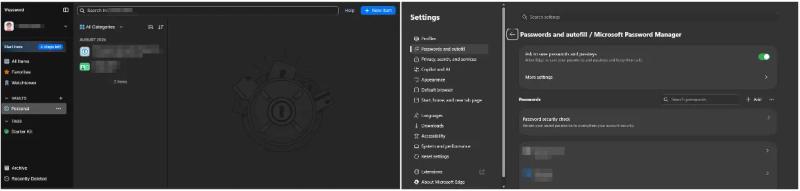
The main weakness of browser-based managers is that unlocking the device often unlocks the password vault as well. If someone manages to bypass authentication for your Windows session or Google account, they can in many configurations access your saved passwords at the same time. In contrast, a dedicated password manager’s vault has its own locking mechanism; consequently, a compromised system session does not automatically expose all your credentials.
Encryption and Credential Storage
Google Password Manager and iCloud Keychain both encrypt stored credentials, and both sync that encrypted data through the respective cloud account. The catch is how much of that process is independently verifiable. Neither Google nor Apple publishes the kind of detailed, third-party security audit that dedicated managers routinely commission.
Bitwarden uses AES-256 encryption with your master password (or passkey) generating the encryption key locally, meaning Bitwarden's own servers never see the key. This is what "zero-knowledge" actually means in practice: even if their servers were breached, the stolen data would be encrypted with a key they never had.
1Password adds an extra layer with its Secret Key, a random string generated on your device during setup that combines with your master password to derive the encryption key. Even a perfect guess of your master password alone isn't enough without that Secret Key, which never leaves your account's registered devices unless you export it yourself.
Autofill Security
Autofill is where a lot of the real-world risk actually lives, because it's the mechanism attackers try to trick. Both browser and dedicated managers check the exact domain before filling credentials, which blocks basic lookalike phishing domains like paypa1.com.
Dedicated managers generally go a step further with stricter domain matching rules and manual confirmation prompts before filling on unfamiliar subdomains. Browser managers tend to be looser here, occasionally autofilling on subdomains that a dedicated manager would flag for review first.
Domain checks only catch what the manager can see, though. They won't stop you from typing credentials into a convincing fake site you reached through a shortened link. Our guides on website safety checks to run before entering any information and why you shouldn't click short links blindly cover that gap.
Passkey Support
This is a fast-moving area. All major players now support passkeys, but portability differs. Google Password Manager and iCloud Keychain both let you create and store passkeys, but for a long time those passkeys stayed locked to their respective ecosystems, meaning a passkey created in Chrome on Android wasn't easily usable in Safari on a Mac.
That's changing. Both Google and 1Password have pushed toward more open passkey portability so credentials aren't trapped in a single vendor's silo. Dedicated managers like 1Password and Bitwarden are generally ahead here since cross-platform portability is core to their whole design, not an add-on.
If you're still relying on SMS codes instead of passkeys, our guide to two-factor authentication and the best 2FA tools breaks down which methods actually hold up against phishing.
Cross-Device Synchronization
Browser managers sync well within their own ecosystem and struggle outside it. Google Password Manager syncs cleanly across every device signed into the same Google account, including Android and Chrome on any OS, but getting those same passwords into Safari or Firefox requires extra steps or extensions.
Dedicated managers sync the same vault across effectively any browser and OS combination, since that's the entire point of the product. If your household or workflow spans Windows, Mac, iOS, and Android without one company owning all of it, this is usually the deciding factor on its own.
Sharing Passwords
Sharing a login with a family member or coworker through a browser manager usually means sending the actual password in a text or email, which defeats a lot of the point of having a manager in the first place. Some browser tools have added basic family sharing, but it's limited and not built for granular control.
Dedicated managers handle this properly. Bitwarden and 1Password both support shared vaults where you grant access to a specific login without ever exposing the plaintext password to the other person, and you can revoke that access instantly without changing the password itself.
Password Generation
Every option covered here includes a built-in password generator, and the underlying math is functionally equivalent. Browser managers default to reasonable lengths (usually 12-16 characters with mixed characters), while dedicated managers typically let you customize length up to 64+ characters and choose between random strings or passphrases.
Given the current NIST guidance favoring length over composition, the ability to easily generate a 20+ character passphrase matters more than it used to. Dedicated managers make this a one-click setting; browser managers often bury it or don't offer passphrase generation at all.
Breach and Security Alerts
Google Password Manager runs a built-in Password Checkup that flags reused, weak, and breached credentials directly in Chrome settings. Apple's Safari does something similar through iCloud Keychain's security recommendations. Both are genuinely useful and require zero setup.
Dedicated managers typically go further with continuous monitoring (Bitwarden calls this a vault health report, 1Password calls it Watchtower) that checks against larger and more frequently updated breach databases, and can alert you the moment a site you use gets added to a new breach, not just when you happen to open settings.
curl -s "https://api.pwnedpasswords.com/range/5BAA6" | head -5This is the same k-anonymity breach-check API that powers most of these audit features under the hood, whether it's a browser or a dedicated manager doing the checking.
Offline Access
Browser managers require you to be signed into the associated account for full functionality, though cached credentials often still autofill without an active connection. True offline-first management isn't really their design goal.
Dedicated managers vary here. Bitwarden and 1Password both cache the encrypted vault locally, so you can access and even edit entries offline, with changes syncing once you're back online. Tools like KeePassXC go further and are built entirely around a local file with no cloud dependency at all, which is worth knowing if cloud sync itself is part of your threat model.
Recovery Options
If you forget your Google or Apple account password, the account recovery process built by Google or Apple kicks in, and it's mature, well-tested infrastructure most people are already familiar with.
Dedicated managers put recovery entirely on you. Lose your 1Password Secret Key and master password together, and there's no account reset button that gets your vault back, by design, because that's exactly what zero-knowledge encryption prevents anyone (including the company) from doing. Bitwarden offers an emergency access feature where a trusted contact can request access after a waiting period, which is the closest thing to a safety net without weakening the encryption model.
Ease of Use
Browser managers win on friction. There's nothing to install, nothing to learn, and autofill just works the moment you save a password. For someone who wants security without ever thinking about it, that matters.
Dedicated managers ask for more upfront: installing an extension, setting a master password, importing existing logins. Once that's done, day-to-day use is close to identical to a browser manager, plus better organization features like folders, tags, and secure notes.
Privacy Considerations
Browser managers tie your credential data to an account that's also collecting a lot of other information about you (search history, browsing habits, ad personalization signals in Google's case). The password vault itself is encrypted, but it lives inside a much larger data ecosystem.
Dedicated managers, particularly ones like Bitwarden that are open source, keep the password vault as the sole product. There's less ambiguity about what else that account is connected to or used for.
Encryption on the vault doesn't help if something on the device itself is already compromised. It's worth knowing how to detect keyloggers on your computer and how to tell if your phone is being monitored , since either one defeats a password manager entirely regardless of which type you use.
Real-World Testing
Across a week of daily use on Windows 11 and macOS Sequoia, Google Password Manager and iCloud Keychain performed reliably for basic save-and-fill within their own ecosystems, and Password Checkup caught genuinely reused passwords without extra setup.
Switching to Bitwarden and 1Password added a short onboarding period (importing roughly 150 saved logins took about 10 minutes for each), but afterward the experience was smoother across browsers, and the sharing and breach-monitoring features caught issues the browser tools didn't flag, including a few older accounts using passwords that showed up in more recent breach lists than the browser's own database had picked up yet.
Browser Manager vs Dedicated Manager: Pros and Cons
Browser manager pros: built in, zero setup, tied to an account you already trust, decent breach checking, free.
Browser manager cons: weak cross-ecosystem sync, limited sharing, vault security tied closely to your OS/account login, less transparency around audits.
Dedicated manager pros: true cross-platform vault, proper secure sharing, stronger zero-knowledge architecture, better breach monitoring, offline access.
Dedicated manager cons: setup time, recovery is entirely your responsibility, premium features often behind a paywall.
Who Should Use Each?
Use a browser manager if you live in one ecosystem end to end (all Apple devices, or all Chrome/Android), don't need to share logins with others, and want the absolute lowest-friction option.
Use a dedicated manager if you use more than one browser or OS regularly, need to share credentials with family or a team securely, or want a vault architecture that doesn't depend on your device login staying secure.
Final Verdict
Neither option is insecure when set up correctly, and the biggest security risk for most people is still password reuse, not which manager brand they picked. That said, a dedicated manager gives you a cleaner security boundary, real cross-platform portability, and sharing that doesn't involve texting a password to your spouse.
If you're already deep in one ecosystem and never touch another browser, the built-in manager paired with strong account security and two-factor authentication is a reasonable choice. For everyone else, the setup time for a dedicated manager pays for itself the first time you need to log into an account from a device or browser you don't normally use.
Whichever you pick, treat it as one piece of a larger routine rather than a fix on its own. Our full guide to building good online security habits walks through the rest of that routine step by step.
FAQ
Is Chrome's password manager actually safe to use? Yes, for basic use. It encrypts stored credentials and includes breach checking through Password Checkup. The main limitation is that vault access is closely tied to your Google account login, so account security matters even more.
Can I use a dedicated password manager and a browser manager at the same time? You can, but it's not recommended. Having both save credentials leads to conflicting autofill prompts and increases the chance you end up with outdated passwords stored in one place after rotating them in the other.
Do dedicated password managers work without an internet connection? Most do, at least partially. Bitwarden and 1Password cache an encrypted local copy of your vault, so you can view and edit entries offline, with sync happening once you reconnect.
Are passkeys stored in a browser manager as secure as ones in a dedicated manager? The underlying cryptography is the same either way, since both rely on the FIDO2/WebAuthn standard. The difference is portability: browser-stored passkeys have historically been more locked to their ecosystem, though this is improving industry-wide.
What happens if I forget my dedicated password manager's master password? In most zero-knowledge designs, there's no way for the company to reset it for you, since they never had access to your key in the first place. This is why setting up an emergency access contact or secure backup for your recovery information matters before you need it, not after.